Phones are now the main way people reach services. About 4.6 billion people
were using mobile internet, that is 57% of the world’s population
, says GSMA. In the U.S., 91% of adults own a smartphone
, according to Pew Research Center.
That shift creates a simple expectation. People want updates, forms, and help on the same device they use for calls and messages. If a process feels slow, they drop off. If they do not get a clear status update, they call, and small teams carry that extra load every day.
Trust is part of the service in tribal programs, so small failures hit harder. If a form breaks, an upload fails, or an approval step feels confusing, people get frustrated fast. Simple fixes like clear status steps, easy login recovery, and role-based access can reduce daily back-and-forth.
This guide on mobile app development for tribal organizations
shares what works in real life. You will learn how to plan the build, pick the right app type, choose between iOS, Android, and Flutter, and understand what drives cost. It also covers security, compliance, data sovereignty, and what to check before hiring a development team.
TL;DR
- Security should be built in from day one.
- Data sovereignty should be protected with clear ownership and access rules.
- Maintenance planning keeps the app stable as phones and store rules change.
- Long-term reliability depends on regular updates, patches, and fixes.
Key Points
- Mobile app development for tribal organizations helps move key services from phone calls and paper to clear, trackable steps on a phone.
- A strong tribal app plan starts by defining users, core workflows, and data sensitivity before choosing features or technology.
- Governance apps typically focus on schedules, notices, documents, and controlled access for member-only content.
- Healthcare apps need extra safeguards because even basic appointment and reminder data can be sensitive in practice.
- Apps for learning are better when they let you use less data, work offline, and make it clear what permissions you need to see cultural training content.
- Tourism apps need to find a middle ground between making it easy for visitors to find things and letting the community decide what places, stories, and media are shared with the public.
Introduction To Mobile App Development For Tribal Organizations
A mobile app is a tool people carry in their pocket. It can share updates, collect forms, and help members get services without long calls or office visits. For many communities, a phone is easier to access than a laptop. So the app often becomes the first place people look for answers.
Mobile app development for tribal organizations means planning and building an app that fits real community needs. It can support programs like housing, health, education, emergency alerts, cultural resources, and local business promotion. But the goal is not “just an app.” The goal is fewer delays, clearer steps, and better trust in the process.
Before writing code, teams should get three things clear. Who will use the app, what jobs it must do, and what data it will store. In real life, this also means planning for weak signal areas, older phones, language access, and data sovereignty. These choices shape the design, the tech stack, and long-term cost.
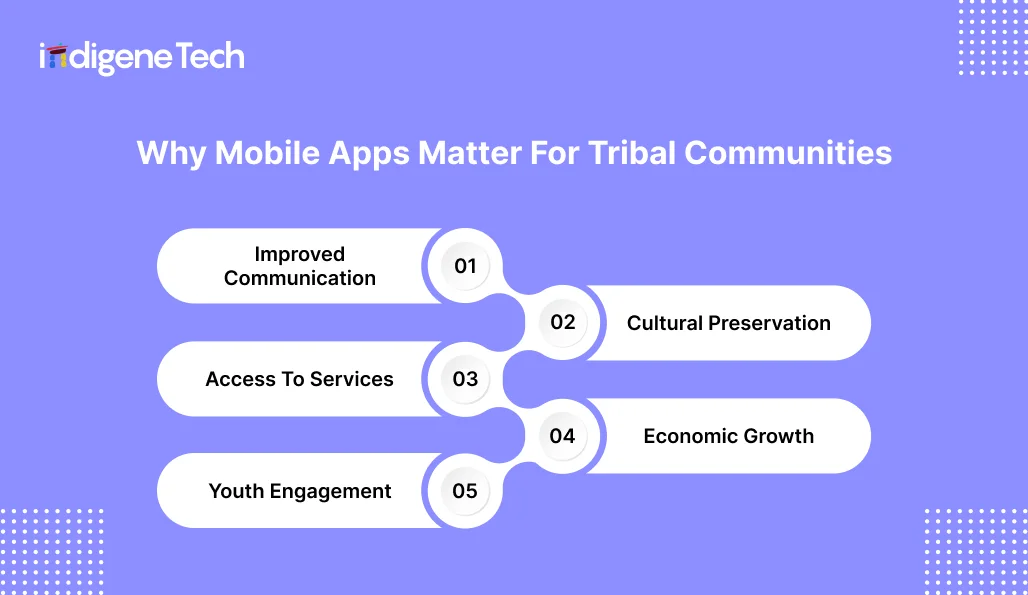
Why Mobile Apps Matter For Tribal Communities
 When a service lives only on paper or phone calls, people wait. Forms get missed, updates get delayed, and the same questions come back all day. Staff spend time answering “Did you get my request?” instead of moving requests forward. That is where
 mobile app development for tribal organizations
starts to matter in real life. A well-built app changes the flow in a practical way. It shows people what to do and how to do it, without confusion. It can guide the next step, list the documents needed, and show where a request stands in the process. Even little things like a status tracker, saved forms, and easy login recovery can help you avoid having to call again. That saves time for members and staff, and it helps protect trust in the system.
1. Improved Communication
Mobile apps help tribal leadership share updates fast. Push notifications can send meeting reminders, road closures, health alerts, grant deadlines, or emergency instructions. This matters most when things change fast, and people need one trusted place for updates.
2. Cultural Preservation
An app can hold language tools, story archives, and cultural learning in one place. This can include a simple dictionary, audio for pronunciation, short videos, or history notes. The big point is control. The community decides what is public, what is members-only, and what stays private.
3. Access To Services
Member services become easier when forms and status updates are in one place. People can apply for housing support, healthcare programs, education grants, or other benefits without repeated office visits. Even a basic “received, in review, approved” tracker reduces confusion and follow-up calls.
4. Economic Growth
Apps can support local businesses and tourism in practical ways. A directory, event calendar, booking links, or a small marketplace can bring more visibility to community-led work. Some tribes also use apps to support gaming operations with staff tools, guest info, or loyalty features, based on needs and permissions.
5. Youth Engagement
Younger members live on mobile. An app can meet them where they already are, without making culture feel “old school.” A short language challenge, event reminders, and youth program updates can help keep participation steady. It also creates a bridge between tradition and today’s habits.
That is why many tribal organizations see mobile app development as a long-term service upgrade, not a one-time build. Results improve when the app matches real workflows and the team protects data sovereignty and long-term support, whether you go with iOS, Android, or Flutter.
Types Of Mobile Apps Tribal Organizations Can Build
The best app depends on what the community needs to get done. Some apps focus on fast updates, like meeting reminders, emergency alerts, and program announcements. Others are service-first, so members can apply for benefits, upload documents, and track request status without making repeat calls. Health and education apps might help with making reservations, sending reminders, creating learning modules, and giving staff and members secure access. Cultural apps can support language learning, stories, and archives, with clear controls on who can view or share content. Tourism and economic development apps can support local businesses through directories, event listings, booking links, and simple visitor guides. Choosing the right app type early in mobile app development for tribal organizations keeps scope under control, protects sensitive data, and makes long-term maintenance easier to plan.
01. Governance Apps
Governance apps help leadership share official updates in one clear place. Members can see council meeting schedules, agendas, and reminders without chasing links or calling offices. Some apps also support voting systems for surveys, feedback, or elections, depending on rules and security needs. Public notices can be posted as alerts so people do not miss deadlines or important changes. Many tribes also include policy documents, forms, and minutes so members can read the latest version anytime. For governance apps, access control matters. Some content can be public, but sensitive items should stay behind a secure member login.
- Council Meeting Schedules: In mobile app development for tribal organizations, this is often the first screen people use. It shows meeting dates, agenda links, and reminders. It reduces missed meetings and last-minute confusion.
- Voting Systems: Voting features need strong security and clear rules. A native app development company can build this with tighter device controls, especially when native app developers handle sign-in, encryption, and audit logs. This is also where iOS app development for Tribal organizations is often preferred for consistent device security.
- Public Notices: Public notices work best with push alerts and a simple archive that people can search. A community app development company can set this up, so updates go out fast, even when staff are busy. If most members use Android phones, Android app development for tribal organization should be planned first, not as an afterthought.
- Policy Documents: With the right permissions, policy files should be easy to read, download, and share. Keep copies of older versions in an archive, but show the most recent one by default. This avoids people using outdated forms.
02. Healthcare Apps
Healthcare apps can cut calls and make care easier to reach. Members can book appointments, check clinic hours, and get simple reminders. Telehealth also helps when travel is hard or schedules are tight. In mobile app development for tribal organizations, health features need extra care because the data is sensitive. Even if the app does not store full medical records, it may still handle names, dates, and visit details. Plan secure login, clear consent screens, and strong data protection from the start. A good build also respects real conditions like low signal areas, older phones, and shared devices in a household. Done right, a healthcare app supports the clinic team and makes access simpler for members.
- Appointment Booking: This lets members request, confirm, or reschedule visits without long phone queues. In mobile app development for tribal organizations, a simple calendar view plus SMS or push reminders usually works well. It also reduces no-shows when clinics run tight schedules.
- Telehealth Services: Telehealth needs stable video or secure call options, plus clear consent screens. A native app development company can build tighter controls for camera, mic, and secure sessions, especially when native app developers follow healthcare security practices from day one. It should also work on low bandwidth, because real networks are not perfect.
- Health Reminders: These reminders can cover vaccinations, follow-ups, screening dates, or daily care plans. A community app development company should make reminders easy to edit, easy to turn off, and never spammy. A lot of teams start with simple reminders and then add smarter scheduling later.
- Prescription Tracking: This can show refill dates, pickup status, and simple medication notes. If the app connects to a pharmacy or clinic system, plan integrations early. For device support, Android app development for tribal organizations matters for reach, while iOS app development for Tribal organizations can help when staff devices are mostly Apple.
03. Education Apps
Education apps help programs run without paper packets and long email chains. They can support language learning with short lessons, audio, and small quizzes that still work on older phones. Cultural training can also sit inside the app, but it needs clear permissions so sensitive content stays protected. Scholarship management is another strong use case. Members can check eligibility, upload documents, and track status in one place. This reduces missed deadlines and lowers repeat follow-ups. Simple videos, reading, and quick checks can help with job training, youth programs, and staff learning through e-learning modules. When making mobile apps for tribal groups, education apps work best when they are easy to use, don't use a lot of data, and are made to be updated over time.
- Language Learning: This can include short lessons, audio pronunciation, and simple quizzes. In mobile app development for tribal organizations, language tools work best when they load fast and work offline for basic content. It also helps to add a “daily practice” reminder that users can switch off.
- Cultural Training: Cultural training can share teachings, protocols, and community guidelines in a respectful format. A community app development company should plan clear permissions so sensitive content stays protected. This is important when elders and program teams want control over what is shared.
- Scholarship Management: This feature helps students find scholarships, upload documents, and track application status. A native app development company can set role-based access so staff review submissions, while members see only their own details. This cuts missed deadlines and reduces repeat follow-up emails.
- E-Learning Modules: E-learning modules can include short videos, simple reading, and small assignments for training programs. Many teams start with a few modules and expand slowly based on usage. For reach, Android app development for tribal organizations often covers more device types, while iOS app development for Tribal organizations can be useful when staff devices are mostly Apple and need consistent performance.
04. Tourism Apps
Tourism apps help visitors plan and book without confusion, and they help tribal teams manage tourism without extra admin work. A good tourism app can handle reservations, ticket booking, event calendars, and basic visitor guidance in one place. It can also support cultural tours with approved stories, audio guides, maps, and “do and don’t” notes that protect respect and privacy. In mobile app development for tribal organizations
, tourism apps need a careful balance. They should promote experiences, but they should not overshare locations, teachings, or community spaces that are not meant for public view. It also helps to design for real travel conditions, like weak signal, last-minute schedule changes, and fast check-in at gates. When it is built well, the tourism app helps visitors plan with less confusion. It also helps local vendors and event teams get steadier bookings and fewer last-minute questions.
- Reservation Systems: Visitors should be able to book a tour or venue without a phone tag game. A good booking flow stays simple in mobile app development for tribal organizations. Pick a date, pick a time slot, confirm, and get a clear receipt on the screen. It should also support staff-side tools to manage slots and cancellations.
- Cultural Tours: Cultural tour features can include maps, audio guides, short videos, and “what to expect” notes. A community app development company should plan content controls so only approved stories and locations are shared. This keeps promotion respectful and avoids oversharing sensitive details.
- Event Information: This covers event calendars, timings, parking info, and last-minute updates. Push notifications help when weather or schedules change. A native app development company can also add location-based tips, but only if users opt in.
- Online Ticket Booking: Ticket booking needs secure payments, QR codes, and fast check-in. Native app developers can add device-level scanning and offline verification, which helps at gates where signal drops. If the visitor base uses mixed devices, plan both Android app development for tribal organizations and iOS app development for Tribal organizations so the experience stays consistent.
05. Economic & Business Apps
Economic and business apps support real revenue work, not just information sharing. Start with a simple tribal business directory. Some organizations also build gaming or casino management apps for internal work. These can handle staff schedules, shift notes, maintenance requests, and loyalty tasks, based on policy and compliance needs. In mobile app development for tribal organizations, these apps need clean data, strong security, and steady uptime because money and operations are involved. Plan admin tools early so staff can update listings, orders, and content without waiting on developers for every small change.
- Tribal Business Directories: This helps members and visitors find local businesses quickly, with phone numbers, hours, and maps. In mobile app development for tribal organizations, directories work best when owners can request updates and staff can approve changes. It keeps info fresh without messy spreadsheets.
- E-Commerce Platforms: An e-commerce app can sell crafts, tickets, local products, or digital content. A native app development company can set up secure payments, basic tax settings, shipping options, and clear order status updates, so buyers always know what is happening. Native app developers can also add features like saved addresses and repeat orders, which matter more than fancy screens.
- Gaming or Casino Management Apps: These apps can support internal operations like staff scheduling, shift notes, maintenance tickets, and guest updates. Some also include loyalty features, offers, and digital membership cards, based on compliance and policies. For device planning, Android app development for tribal organizations may be important for staff phone variety, while iOS app development for Tribal organizations can fit executive or admin device standards.
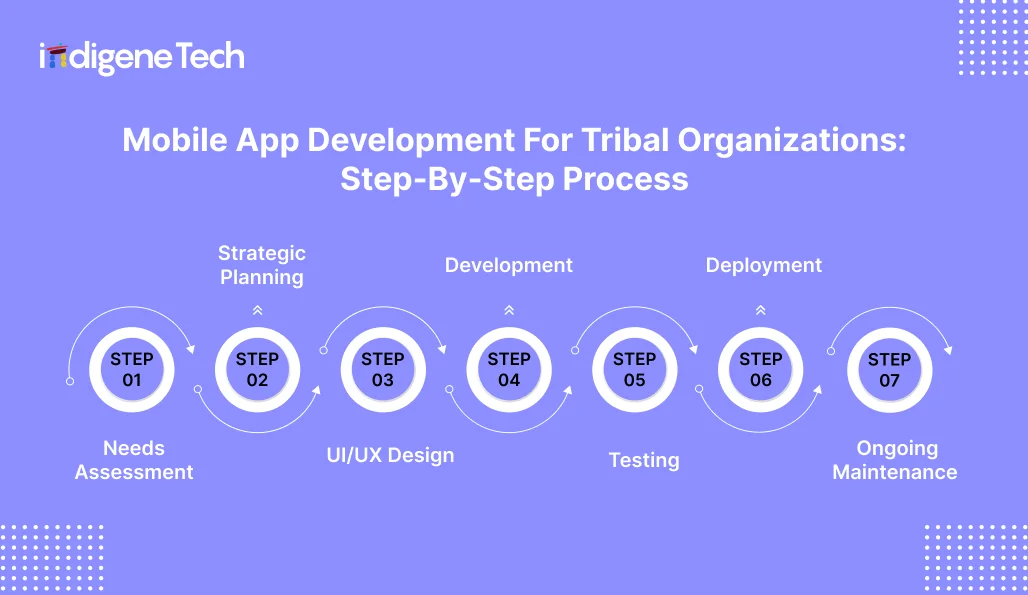
Mobile App Development For Tribal Organizations: Step-By-Step Process
 A good app does not start with code. It starts with understanding what people need, then mapping the app to real workflows. In mobile app development for tribal organizations, this matters more because apps can touch sensitive services, community trust, and tribal data. The goal is simple. Build something people can use on day one, and staff can support after launch.
Step 1: Needs Assessment
This step gives the app its direction. If the direction is unclear, the build gets messy and expensive later. In mobile app development for tribal organizations, a needs assessment should stay practical. List who will use the app and what phones they likely have, because staff may use newer devices while members may be on older Android phones with limited data. Then pick the top 2–3 jobs the app must do well, like sending emergency alerts or letting members apply for benefits and track status.
Step 2: Strategic Planning
Once you know what the community needs, turn it into a clear plan that the team can follow. This is also where you stop the project from growing every week with new ideas. In mobile app development for tribal organizations, good planning helps you avoid last-minute changes that increase cost and delay the launch.
First, split the app work into two lists. One list is “must-have,” things the app must do from day one, like letting people request a service, get alerts, or sign in. The second list is “nice-to-have,” things you can add later, after the first version is working well.
Next, choose the phone type based on what people actually use. If most members use Android phones, start with Android app development for tribal organization, or plan one app that works on both Android and iPhone.
Then decide where the app’s information will be saved and who can access it. A native app development company can guide this part, but the tribe should confirm who owns the data and who controls access before anything goes live.
Finally, set a budget that covers the full journey. This includes planning, design, building, testing, launch, and yearly updates. Keep some extra money aside for connecting with other systems and meeting rules, because these parts often take more time than expected.
Step 3: UI/UX Design
This step decides how the app feels in a person’s hand. If screens are confusing, people stop using the app, even if the tech is solid. In mobile app development for tribal organizations
, design also carries cultural meaning, so it needs care and review.
- Language Accessibility: Use clear English and add tribal language options when needed. Keep text large, avoid tiny buttons, and make key actions easy to find. If the app serves elders, use simple labels and keep screens uncluttered.
- Simple Navigation: Keep the main tasks within 1–2 taps. Use a small number of menu items and name them in plain words like “Services,” “Events,” “Forms,” or “Updates.” Complex navigation is a common reason service apps fail.
- Cultural Symbols And Branding: Use community-approved colors, patterns, and symbols. Do this with permission and context, not as decoration. Create a small style guide so the design stays consistent across iOS and Android screens.
Step 4: Development
This is where the plan becomes a working app. The team builds the screens, connects them to the backend, and sets up key features like login, forms, notifications, and admin tools. In mobile app development for tribal organizations
, development should happen in small sprints, not one big “final delivery.” That way, tribal staff can review real builds early and catch gaps before they become expensive fixes.
Step 5: Testing
Testing is where you find the problems before members do. If an app crashes, sends wrong notifications, or fails during login, people lose trust fast. In mobile app development for tribal organizations
, testing should happen on real devices and real networks, not only on a fast office Wi-Fi.
Step 6: Deployment
In mobile app development for tribal organizations, this stage should include a clear launch plan, not just store approval. Before publishing, the team should lock the version, run final security checks, and confirm that analytics and crash reporting are working. Store listings also matter. For Android, Google Play also checks policies, but device coverage and app signing need attention. After release, plan a soft launch first. Roll it out to a small group, watch issues for 7–14 days, then promote it widely. This avoids a public launch that starts with negative reviews and support overload.
Step 7: Ongoing Maintenance
Launch is not the finish line. Phone updates, store rules changes, and small bugs show up only after real people start using the app. In mobile app development for tribal organizations
, maintenance is what keeps trust steady. That is why staff need an admin panel that is simple to use. Over time, you may add new features based on real usage, not guesses, like better form status tracking or improved notifications. A simple maintenance plan with monthly checks and a clear support contact prevents the app from becoming outdated, even if the team is small.
iOS App Development For Tribal Organizations
If the app is used for member services, benefits, or health support, you need tighter safety checks. iPhone apps often handle this well when built carefully. In real life, many members use Android phones. So most teams plan both, iPhone for office use and Android for wider reach. The right choice depends on who will use the app more and what kind of information the app must keep safe. best answer. It fits best when you want steady performance and stronger safety rules.
Why Choose iOS?
- Better Safety: iPhones have good safety features, but they help only when the app is built properly. This reduces the chance of member or program information leaking or being misused.
- Smoother Use: iPhones and iPads usually run apps without lag because the phone and system are made to work together. This helps when the app has forms, file uploads, maps, or videos that can feel slow on cheaper phones.
- Popular Among Government Users: Many government teams already use iPhones for daily work. If staff and leadership are on Apple devices, an iOS app fits their routine with less training and fewer device issues.
- Fewer Phone Types: iPhones come in fewer models than Android phones. So it is easier to check the app, fix issues, and push updates, especially when the support team is small.
- Clear Privacy Settings: iPhones clearly show when the app wants to use location, camera, or mic. This matters when the app handles private work, like health support, sign-in, or map-based services.
Key Features in iOS Tribal Apps
- Face ID Login: Face ID or Touch ID makes sign-in quick, so people do not get stuck with password resets. It also protects the app if a phone is shared or lost, especially when the app logs out after some idle time.
- Push Alerts: Alerts help with meeting reminders, emergency updates, clinic notices, and grant deadlines. Keep them under control. Let people choose what they want, so important alerts do not get lost.
- Wallet Pass: Some apps add a digital ID or membership card to Apple Wallet. If you do this, set clear rules first. You need a strong check before issuing it, and an easy way to cancel or replace it if needed.
- Data Safety: Keep member information protected when it moves and when it is saved. This matters for service requests, personal details, and health-related work. Treat this as basic safety, not an extra feature.
- Easy to Use: Make the app comfortable for elders and low-vision users. Use bigger text, clear colours, voice support where possible, and buttons that are easy to tap.
Cost of iOS App Development
The cost for iOS app development for Tribal organizations
mainly depends on scope. A simple information app is very different from a service app with logins, forms, document uploads, and an admin panel. Pricing also changes when you add integrations, offline use, and higher security.
| Complexity |
Average Cost |
| Basic |
$20,000–$50,000 |
| Medium |
$50,000–$120,000 |
| Complex |
$100,000+ |
Factors Affecting Cost
- Custom Design: Custom UI/UX work takes time because it is not just colours and icons. It includes user flows, screen states, accessibility, and cultural review cycles. More screens and more roles usually mean more design time.
- Data and Admin Setup: Most service apps need a place where all information is saved and managed. This is also where user accounts and access rules are handled. Cost goes up when you add things like different user roles, document storage, a record of who did what, or a way to use the app without a signal and sync later. You also need regular upkeep for this setup, not just a one-time spend.
- API Integrations: Integrations add cost because you are connecting to other systems like health platforms, payment tools, GIS maps, or member databases. The tricky part is not only “connecting.” It handles errors, retries, and data matching so the app stays stable.
- Safety Rules: If the app handles health or benefits details, plan safety from the start. This can mean stronger sign-in, extra checks during login, and regular safety testing before and after launch. The more private the data, the more time you will spend on reviews and approvals.
- Ongoing Upkeep: After launch, the work does not stop. Phones keep changing, and the app must keep up. You will need regular updates to fix bugs, close safety gaps, and keep the app running smoothly. If upkeep is ignored, the app slowly becomes unreliable and people stop trusting it.
Android App Development for Tribal Organizations
Android often matters most because many members use Android phones across different price ranges. That variety is both the strength and the challenge. In Android app development for tribal organization projects, the app must work on older devices, smaller screens, and slower networks, not only on the newest models. This affects design, testing, and even how you handle file uploads and offline access. If the app supports healthcare or benefits, security and data protection need extra focus from day one. The best results come when Android is planned around real usage, not assumed to be a “second platform” added at the end.
Why Choose Android?
- Reach More Members: Android phones are ordinary in many homes, including budget and mid-range models. If the goal is to reach more members, Android is often the first place to start.
- Fits Many Budgets: Android works on a wide range of phones, from basic to premium. This helps when people do not change phones often. It also means the app should be checked on older devices, not only new ones.
- Good for Field Work: Many program staff use Android phones during visits and on-site work because these phones are easier to replace and available in many models. This helps with staff tasks done outside the office.
- Supports Daily Tasks: Android works well for things like taking photos of documents, uploading files, using maps, and sending updates in the background. These are common needs in service apps.
- Works on Many Devices: Android has many screen sizes and phone types. A good plan focuses on making the app run well on small screens, low-storage phones, and slower networks, because that is the real situation for many users.
Key Features in Android Tribal Apps
- Secure Login: Set it up so members, staff, and admins see only what they should. Keep password reset simple. If the phone supports it, allow fingerprint or Face ID as an option.
- Smart Alerts: Use alerts for emergency updates, meeting reminders, clinic notices, and deadlines. Let people choose what they want to receive, or they will switch off notifications and miss important updates.
- Offline Access: Cache key pages like contacts, forms, and event details so the app still works in low-signal areas. Sync data once the phone is back online.
- Quick Uploads: Allow users to scan documents with the camera and upload files without errors. Add clear file limits and progress indicators, so people know the upload is working.
- Map Support: Show clinic locations, offices, events, and tourism spots with simple maps and directions. Keep location sharing optional and explain why it is needed.
- Easy Reading: Support larger text, clear contrast, and tappable buttons for elders and low-vision users. Test on small screens to ensure nothing gets cut off.
Cost of Android App Development
The cost of Android apps depends on how many workflows you are building and how much backend work is needed. A basic Android app with simple screens costs far less than an app with logins, roles, forms, uploads, and integrations. For early planning, these ranges are commonly used across the market.
| Android App Complexity |
Typical Cost Range (USD) |
| Basic |
$20,000–$50,000 |
| Medium |
$50,000–$120,000 |
| Complex |
$100,000–$250,000+ |
Factors Affecting Cost
- Number of Screens and Tasks: More tasks mean more pages in the app, more “what if” situations, and more checking. A benefits form with document upload and status tracking takes more time than a simple news and events app.
- Data and Staff Setup: If staff need to review requests, approve documents, or post updates, you need a proper place to manage all that. Costs go up when you add different user roles, document storage, and a clear record of actions.
- Phone Testing: Android phones come in many shapes, sizes, and price ranges. Testing on older phones, low-storage devices, and slow networks takes time, but it stops the app from breaking for real users after launch.
- Works Without Signal: Offline use is helpful in low-signal areas, but it takes extra effort. The app must save work safely and update it later when the phone gets signal again.
- Connects With Other Tools: If the app needs to connect with payments, maps, health systems, or member records, the work becomes heavier. These connections need proper handling when something fails, not just a one-time setup.
- Safety and Rules: Stronger safety steps add time and cost, especially for health or benefits apps. More private data usually means more reviews and stricter checks.
- Upkeep After Launch: Updates do not stop after release. You will still need fixes, safety updates, and small improvements. Apps with frequent changes or many connections usually need more ongoing support.
Suggested Article: Why Indigenous Owned and Operated Tech Businesses Are Essential for Sustainable Development in Canada?
Flutter App Development for Tribal Organizations
Flutter is useful when you want the same app on both iPhone and Android, without making two separate apps. This can save time in the first phase, especially when many screens are the same, like updates, events, service forms, and documents. In Flutter app development for tribal organizations, this helps when the budget is tight but you still want the app to reach most members.
Still, keep expectations real. Some phone functions and offline use can take extra effort, depending on what the app must do. Testing also stays important because the app still has to work on many Android phones and different iPhone models.
A practical way is to start with a simple, solid version first. Make sure the main tasks work well, then add heavier features after the app is stable. Flutter is a good fit when you want the same look across phones and easier updates later. If you need the strongest control for every phone feature, a fully separate iPhone and Android build may suit you better.
Why Choose Flutter?
- Faster Launch: Flutter lets teams build one codebase for iOS and Android. That can reduce build time for version one, especially for shared screens like forms, events, and updates.
- Lower Build Effort: Instead of maintaining two separate apps, you maintain one main codebase. This can reduce duplicate work for fixes and small feature updates.
- Consistent Design: Flutter makes it easier to keep the same look and behaviour across iPhone and Android devices. That consistency helps when training staff and supporting users.
- Smooth Performance: Flutter apps can feel fast and responsive when built well. This is useful for media screens, lists, and multi-step service forms.
- Easier Iteration: When requirements change, Flutter can make it simpler to adjust UI and workflows without rebuilding everything twice. It fits well for phased rollouts and frequent improvements.
Key Features in Flutter Tribal Apps
- Shared Builds: One codebase can support both iOS and Android. This keeps features aligned, so a fix on one platform does not lag on the other.
- Secure Roles: Set role-based access for members, staff, and admins. This helps protect sensitive screens like benefits, healthcare requests, or staff-only documents.
- Offline Access: Save key content and form progress when the network is weak. Sync the data later, once the phone reconnects, using clear conflict rules.
- Easy Forms: Build clean multi-step forms with progress indicators. Add file upload checks so users know what was submitted and what failed.
- Media Learning: Support audio, images, and short videos for language and cultural learning. Keep files optimized so pages load fast on limited data plans.
- Staff Controls: Connect the app to an admin panel so staff can post updates, manage events, and review submissions. This reduces day-to-day dependency on developers.
Cost Of Flutter App Development
Flutter costs depend on scope, just like native apps. The difference is that Flutter can reduce duplicated work when you need both iOS and Android, because you build one shared codebase. That can lower total build effort for a two-platform launch, especially for apps with shared screens like updates, events, service forms, and document access.
| Flutter App Complexity |
Typical Cost Range (USD) |
| Basic |
$25,000–$60,000 |
| Medium |
$60,000–$140,000 |
| Complex |
$120,000–$250,000+ |
Factors Affecting Cost
- Data and Staff Access: Flutter apps still need a place where all information is saved and managed. Staff also need a simple control screen to review requests and post updates. Cost goes up when you add different user roles, document storage, and a record of actions.
- Works Without Signal: Offline use is a big help in low-signal areas, but it takes extra work. The app must save work safely and update it later when the phone gets signal again. You also need rules for what happens if the same item is edited twice.
- Connects With Other Systems: If the app needs to connect to member records, payments, health services, or maps, it takes more time. These links must still work when something fails, not only when everything is perfect.
- iPhone and Android Differences: Some phone features still need separate work for iPhone and Android. This includes some types of biometric login, wallet passes, background updates, and on-device scanning. So the “one app for both” benefit can be reduced for these parts.
- Design and Ease of Use: Custom design, more than one language, and making the app easy for elders add effort. Plan bigger text, clear colours, and simple navigation from day one, or you will redo screens later.
- Testing on Real Phones: Flutter still needs testing on many Android models and different iPhone sizes. Testing on older phones and weak networks takes time, but it prevents painful issues after launch.
- Upkeep After Launch: You will still need regular updates. Phones change, safety fixes come up, and small improvements are needed. If you update often, you need more ongoing support.
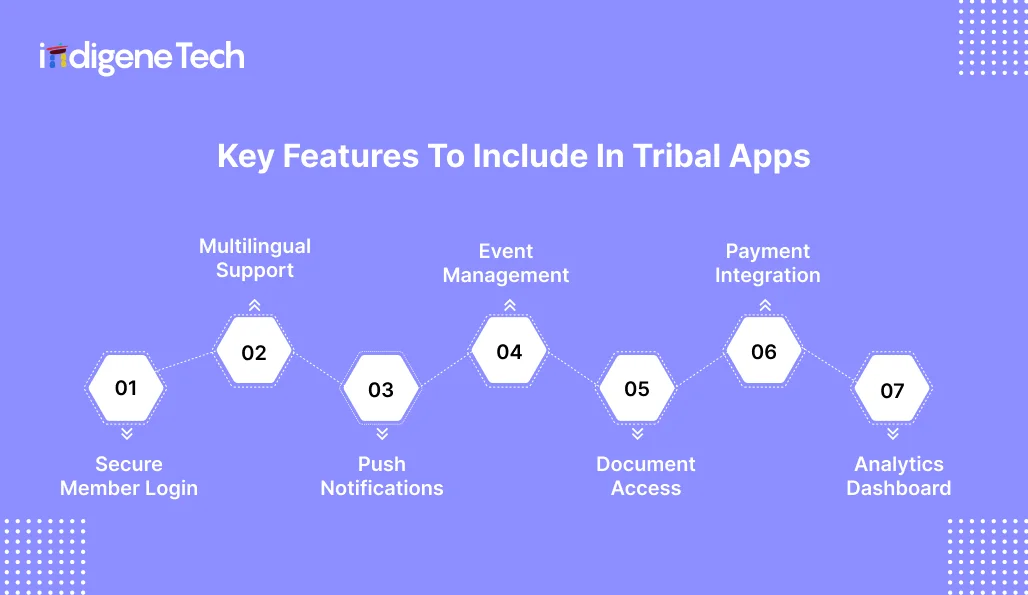
Key Features To Include In Tribal Apps
 The right features depend on the goal of the app, but some basics show up again and again. These features help people complete tasks without calling offices, and they help staff manage programs without constant manual follow-ups. They also affect cost because each feature adds screens, backend work, and security decisions. In
 mobile app development for tribal organizations
, it helps to choose a small set of “must-have” features for version one, then add the rest after real users start using the app.
A secure login protects member-only content and sensitive workflows. Role-based access matters here. Staff, members, and administrators should not see the same screens or data. A native app development company
can build stronger device-level security, like biometrics and secure storage, but the rules still need to be defined by the organization. Also, plan account recovery early, because that is where many apps break in real life.
If the community wants tribal language options, plan it from the first design draft. It is not a “later” feature. You need space for longer words, easy switching between languages, and clear translations for buttons and alerts. A community app development company should also test this on older devices, so text does not overlap or become unreadable.
Push notifications are one of the most useful features when used carefully. They can send emergency alerts, meeting updates, clinic notices, and grant deadlines. This needs solid setup in both Android app development for tribal organizations
and iOS app development for Tribal organizations
, because notification behaviour differs by platform. Users should control what they receive, or they will mute alerts and miss important updates.
A calendar with RSVPs supports community events, training sessions, cultural programs, and clinic drives. Add basics like location, time, and “what to bring.” Native app developers can also add device calendar sync if needed, but keep the first version simple so it stays reliable.
Many apps need a document library for policy documents, forms, and program guides. The app should show the latest version first and archive older versions clearly, so people do not fill the wrong form. This feature also needs role-based access if some documents are member-only or staff-only.
Payments may be needed for fees, event tickets, donations, or vendor bookings. If you add payments, keep it safe and clear. People should get a proper receipt, and staff should be able to handle refunds without drama. A native app development company can set this up in a safer way, but it will still take extra time. More safety checks and more testing are needed, so the timeline and budget will go up.
Analytics help you see what is working and what is being ignored. Track simple signals like active users, top screens, form drop-offs, and notification opens. Keep analytics respectful and minimal. A good community app development company
will set up dashboards that staff can read without technical training.
Funding & Grant Opportunities
Many tribal organizations do not pay for an app only from one budget line. They blend funding, build in phases, and tie the app to a clear program goal like health access, language preservation, or service delivery. A practical way to start is to list the top 2 workflows the app will improve, then match them to the right funding bucket. That keeps the project grounded and easier to justify.
- Federal Digital Transformation Grants: Start with Grants.gov for federal opportunities and eligibility filters for tribal governments and tribal organizations. It is the main hub for many federal notices.
- Tribal Government Modernization Funds: Some modernization support sits inside agency grant programs, including Interior-related grant pathways listed through Grants.gov. Look for programs that fund service delivery, records, and community-facing tools.
- Healthcare IT Grants: For health apps, check Indian Health Service funding announcements and programs like the Tribal Management Grant Program. These sources often support capacity, systems, and health management improvements that can include app-related work.
- Education Technology Funding: If your app supports learning, training, or language work, look at Indian Affairs language and culture funding options like the Living Languages Grant Program.
- Economic Development Grants: For business and growth initiatives, tribal funding and technical assistance pages from agencies like the U.S. Department of Energy’s Office of Indian Energy can be a useful place to track active opportunities.
One small tip that saves time. Write your budget in “modules” (discovery, design, build, testing, launch, year-1 support). Grant reviewers understand that structure, and it maps cleanly to mobile app development for tribal organizations
.
Security, Compliance & Data Sovereignty
Security is not a “nice add-on” in mobile app development for tribal organizations
. It is the base layer. If members worry their data is unsafe, they will stop using the app. If staff cannot trust the system, they will go back to calls, paper, and spreadsheets.
Encrypt data while it moves (app to server) and where it sits (in storage). This protects against simple leaks, like someone intercepting traffic on public Wi-Fi. Also, decide what should never be stored on the phone, especially if devices are shared in a home.
-
HIPAA Compliance (For Healthcare Apps)
If the app handles electronic protected health information (ePHI), HIPAA’s Security Rule expects “reasonable and appropriate” safeguards across administrative, physical, and technical controls. Even when you do not store full medical records, small data like appointment details can still be sensitive. Treat it that way, and document how it is protected.
-
Multi-Factor Authentication
Multi-factor authentication (MFA) means using more than one factor, like a password plus a code, or biometrics plus a device check. NIST defines MFA as requiring more than one distinct authentication factor. Use MFA for staff roles and admin access at a minimum. For members, you can offer it as optional, based on risk and usability.
If you use cloud services, security is shared. The cloud provider secures parts of the platform, but your team still owns decisions like access roles, logging, encryption settings, and data retention. This shared responsibility model is explained in guidance from AWS and CISA.
So “we host on the cloud” is not a security plan. The configuration is the plan.
-
Tribal Data Ownership Agreements
Put ownership in writing. Who owns the code? Who owns the database? Who has admin keys? How do you export data? What happens if you change vendors? This is the difference between true control and vendor lock-in.
Maintenance & Long-Term Strategy
Maintenance is what keeps an app useful after the first launch buzz fades. Phones get OS updates, app store rules change, and new security issues show up without warning. If the app is not updated, small bugs become big support problems, and members stop trusting the tool. A long-term strategy also helps the app grow in a calm, planned way. You fix what users struggle with, improve key workflows, then add new features only when they are truly needed. This approach protects budget and avoids bloated apps that nobody enjoys using. For tribal organizations, it also supports continuity, because programs and staff change over time, but the app still needs to run smoothly and stay secure.
New iOS and Android versions can break small things like notifications, file uploads, or login flows. Regular OS update checks help you catch issues early, before users start reporting problems. It also keeps the app compatible with newer devices and store requirements.
Security patches fix known risks in the app, backend, and third-party libraries. This is not optional work, especially if the app handles member data, services, or payments. Delaying patches increases the chance of data exposure and trust loss.
Bugs are small failures that block real tasks, like a form not submitting or a screen freezing. Fixing them quickly keeps support calls low and keeps users confident. It also improves app store ratings over time.
Performance work is about speed and stability. It can include reducing load time, improving offline handling, and making uploads more reliable on weak networks. This matters a lot for users on older phones or with limited data.
Make upgrades based on real use, not assumptions. Fix the parts people use every week first, like forms, alerts, and status updates. Add new features only when there is a real need, and your team can keep them running without struggle.
Choosing A Native App Development Company
Picking the right team matters as much as picking the right features. A native build touches sensitive areas like login, device storage, notifications, and sometimes health or benefits data. If the wrong team ships a rushed app, you will pay twice. Once to build it, and again to fix it.
A solid native app development company should start by asking hard questions. Who are the users? What data is stored? What happens if the network drops? Who updates content after launch? If they jump straight to a quote without this, be careful.
What Is Native App Development?
Native app development means you make two apps, one for iPhone and one for Android. Each one is built to suit that phone, so it feels familiar and runs smoothly. The big plus is that phone features work better, like fingerprint or Face ID login, camera uploads, location, and alerts. The downside is simple too. It takes more time and costs more, because you are building and looking after two apps, not one.
Benefits Of Native App Development
Native app development works well when you want the app to run fast, stay stable, and keep data safer on real phones. You build one app for iPhone and one for Android, so each one follows the normal way that phone works. This usually means fewer crashes and smoother use, especially for Face ID or fingerprint login, camera uploads, maps, and alerts.
The trade-off is time and cost. You are building two apps, so checking and updating them also takes double effort. For apps that handle member services and private details, many teams still choose native because it is easier to keep the app steady and the safety rules clear.
- Better Performance: Screens load faster and feel smoother, especially for maps, videos, file uploads, and long forms.
- Stronger Safety: The app can use the phone’s built-in safety options more directly, which helps when handling private member data or working on benefits.
- Easier To Use: The app feels familiar because buttons and menus behave as people expect on that phone.
- Uses Phone Features Well: Camera, location, alerts, and other phone tools work more reliably, which helps with everyday tasks like scanning documents and sending urgent updates.
How To Choose The Right Native App Development Company
Choosing the right native app development company is not about who talks the sweetest. It is about who can build it safely, explain it in simple words, and support you after the app goes live. Start by checking if they have done projects with approvals and step-by-step service work, because tribal apps usually work like that. Then ask direct questions about data sovereignty. Where will your data stay, who gets admin access, and how will you take everything out if you change teams later? Keep safety questions straight too. If answers feel vague, treat it as a warning.
- Similar Work Experience: Pick a team that has built service apps before, especially ones with approvals, member sign-in, and staff review steps. Ask what went wrong in their last launch and how they fixed it. A clear answer tells you more than a polished demo.
- Data Ownership Respect: They should clearly explain where your data will be stored and who can access it. Make sure the contract says the tribe owns the data and can download it anytime. Also, confirm you can switch vendors later without getting stuck.
- Clear Safety Approach: Ask how they protect accounts, handle lost phones, and manage password resets safely. Ask how they check the app for safety problems before launch. A good team will explain it in plain words.
- Transparent Pricing: The quote should show costs step by step. It should also say what is not included, like paid tools, special add-ons, or moving old data into the new app.
- Support After Launch: The work does not end on launch day. Apps need regular fixes and updates. Ask what monthly support looks like, how quickly they handle urgent issues, and who you contact when something breaks. A simple maintenance plan is a must.
- Cultural Sensitivity: Choose a team that respects community review cycles and local context. They should take feedback seriously on language, symbols, and what content must stay private.
Future Trends in Tribal Mobile App Development
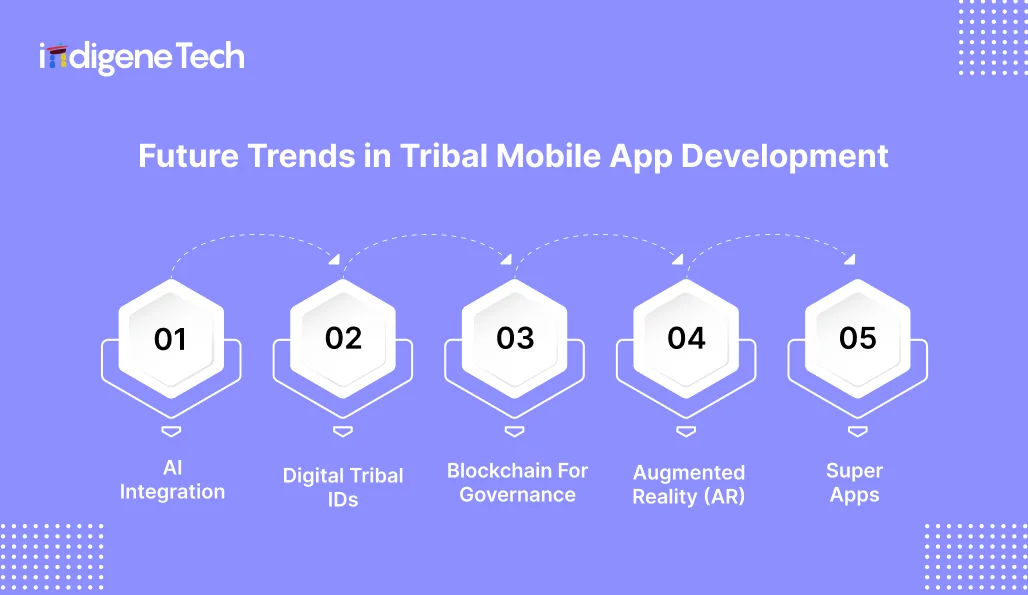 Future trends are shifting tribal apps from simple information tools to full-service platforms. In mobile app development for tribal organizations, the biggest change is smarter self-service. More apps now include chat support for common questions, digital IDs for faster verification, and better offline use for low-signal areas. Some teams are also exploring secure voting and records, but those projects need strong governance rules and careful security checks. AR is growing too, mainly for cultural education and tourism, like guided experiences and language learning overlays. Another trend is “one app” thinking, where a single app handles updates, events, services, and payments, instead of many small apps. The key is to adopt trends only when the community has the capacity to maintain them safely after launch.
1. AI Integration
AI is showing up first as simple chat support, not complex automation. A chatbot can answer common questions like office hours, form steps, and program eligibility, anytime. It can also guide users to the right form and reduce repeat calls. In practice, it needs strong content rules and clear limits, so it does not guess or give wrong advice.
2. Digital Tribal IDs
Digital IDs can work like a mobile membership card or service access pass. They can help with check-ins at events, clinic verification, or program access, based on policy. The key is trust and control. You need clear verification, safe revocation if a phone is lost, and rules on where the ID can be used.
3. Blockchain For Governance
Some teams explore blockchain for voting and records because it can create tamper-evident logs. But it is not a shortcut to security. It still needs strong identity verification, clear election rules, and independent audits. Without those, the system can still be challenged, even if the tech looks “secure.”
4. Augmented Reality (AR)
AR is being used for interactive cultural learning and tourism experiences. For example, a user can scan a place or object and see language notes, stories, or guided tour content. The biggest constraint is content creation and device support, because AR needs good phones and careful design. It works best when kept lightweight and optional.
5. Super Apps
A super app combines governance updates, services, events, payments, and business tools in one place. It can reduce the need to manage many separate apps and logins. The trade-off is complexity. It needs strong navigation, role-based access, and a clear plan for maintenance, or it becomes cluttered and hard to use.
Final Thoughts
A mobile app can help people reach tribal services faster, but only if it matches how work actually happens. Start with the weekly basics, like updates, forms, and tracking request status. Keep the first version small, steady, and easy for staff to manage.
Decide security and data sovereignty at the start, not after the screens are ready. Be clear on who owns the data, who controls access, and how you can download everything if you ever change vendors. If the app handles health or benefits, plan stronger protection from day one.
Costs stay more in control when you build in phases. First, plan it properly, then launch a solid core version, then add features based on real use. That is how mobile app development for tribal organizations
becomes a long-term service upgrade, not a one-time project that dies after launch.
FAQs
1. How long does it usually take to develop a mobile app for tribal organizations?
Once the plan is clear, a simple app with news, events, and basic pages can be done in about 8 to 12 weeks. A member sign-in, forms, document upload, and staff controls app is generally 3 to 6 months. Adding ties to other systems, stronger security audits, and multiple user types can extend the timeline.
2. Should we start with iOS or Android, or both?
Go where the users are. If the majority of members have Android phones, then start Android app development for tribal organization. If the leadership and office staff mostly use iPhones, plan iOS app development for Tribal organizations early for admin and staff use. Most teams release one first, get the basics right, then add the second one.
3. What features are the most impactful for the first version?
Start with a secure login, straightforward request forms, a simple status tracker, and handy notifications. If it really saves time calling the office, add documents and events. Leave payments and big add-ons for phase two unless they are really necessary from day one.
4. How to ensure tribal data sovereignty is preserved in the app?
This should be clearly written and communicated from the first day. Clearly outline data ownership, data control, and other operational data.